 |
HP 200LX >
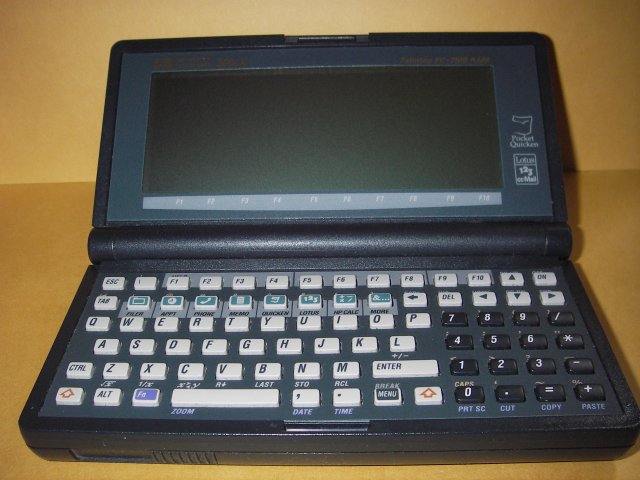
An 80-key QUERTY keyboard with a separate number pad, 10 function keys, and 8 application keys.
-
80-key QWERTY keyboard
- Hard “chicklet” key-style.
- FIXME – separate keyboard with # of keys
- 10 function keys
- 8 pre-defined application keys for the built-in apps.
— FIXME – They are re-definable, explain how
-
HP 200LX and macros — The keyboard may be completely controlled via automatic macros.
Table of Contents [hide]
Additional Stuff ∞
- Very easy and not tiring to type with one’s thumbs while on the go, and quite fast, although a bit awkward to type with multiple fingers. This keyboard type is a must-have for people with big thumbs, because the keys are small, hard and spaced apart and can be felt easier than laptop-style or bubble keys.
F11andF12are accessible via FIXME.- FIXME — List the complete keyboard layout, including all special keys and special characters.
- TODO – Where is the pause key?
-
Scan codes are broken:
- Cannot use
altcodes! (203=e with accent) - FIXME: map the
alt-codes.
- Cannot use
- Be careful not to hit the
enterorspace baron the side, it could break. Not generally a concern. -
The Newton keyboard can be adapted to the HP 200LX adaptable keyboard (a custom program must be run, freely available, and a patch cable must be fabricated)
-
The Jordana 430SE keyboard can be adapted for the 200lx / HP Windows CE device ($140USD).
- Requires a standard serial port adapter (connectivity kit)
-
A “real” keyboard can be plugged into the HP Palmtop, which you can now do with the HP 95LX and Centronics new Dock 101 keyboard (won’t work with all programs, some poll the palmtop keyboard. Also, this keyboard requires an AC outlet)
- FIXME – get a link


ported