 |
Computers > Portable computing >
People have different desires and needs. Mine will be different than many people’s desires and needs, and as such, some of the items which disqualify one particular product may not do so for you. Here is the list of qualifying factors which I kept in mind when researching palmtops:
2009-03-20 notes:
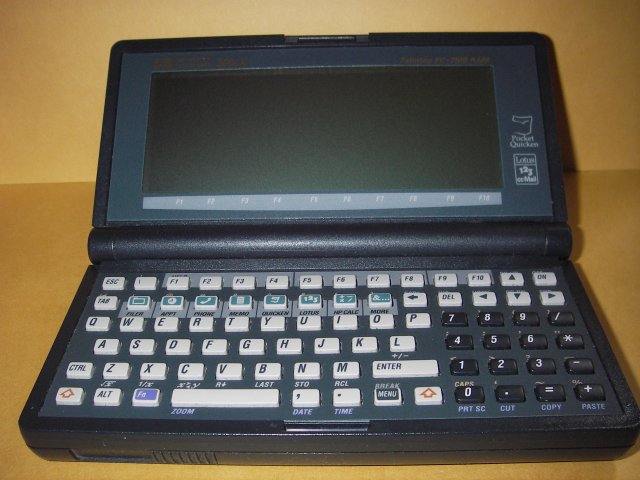
- I own, but don’t use my HP 200LX.
- I own a Zaurus SL-C1000.
-
TODO – This page needs to be updated to include the Zaurus SL-C1000 and maybe some other new Portable computing stuff.
The commoner’s considerations ∞
Size – Small ∞
The item in question has to fit in a pocket. It has to be portable without any equipment whatsoever. Spare batteries might be considered, but ac power cords or other doodads are right out. The most separating factor between devices has always been it’s size. Pretty much every new device is so absolutely gargantuan that it cannot possibly be of any real use. A laptop, even a subnotebook is right out. The newer wince (Windows CE) machines are 75% the size of a desktop keyboard! Try fitting that in your pocket!
Style – Nondescript ∞
It has to be nondescript to the uneducated. The last thing I want is to murder someone in the defence of my electronic baby. If it’s a 1/2″ thick laptop, I wouldn’t try carrying it around without a case (and a gun).
Cost – Mid-range, sustainable ∞
If the initial cost is expensive, that’s perfectly reasonable. However, I don’t want to constantly shell out for upgrades or software patches. I also want a renewable warranty. I also want to avoid a huge amount of expensive doodads. Most of the newer devices have a good warranty, which makes me wary of older devices. Finding them in the first place may be difficult.. but try getting repairs.
Ergonomics – Comfortable, useful ∞
Size and comfort are difficult to combine. It has to be a pleasant and unbothersome mix of small and easy to hold / easy to stare at.
Ability – Powerful ∞
It has to have an impossibly magnificent range of use. I lean towards near-100% real computers as opposed to “personal organizers”. Personal organization should be well-integrated.
Uncommon considerations ∞
Compatability – Backwards ∞
I don’t want to step out from my niche of knowledge to learn a completely new operating system or sets of software. I want to use as much of my old knowledge as possible. I want nearly unrestricted access to the newer technologies – information formats, networking, internet, etc.
Storage – Massive ∞
I want to be able to duplicate nearly 100% of the content maintained on my desktop computer.
Connectivity – Wide Range ∞
First and foremost I want to be able to connect to my desktop for easy file transfer and information updates. Secondly, I want to be able to share information with others on the road preferably without having to deal with cables or disks.
See Remote controlling software
Power – Long-term ∞
Extended battery life.. it doesn’t have to last a month, but it does have to last a day — all day, powered up and in use.
Support – Legendary ∞
I absolutely insist upon legendary support. I want warranty support, user support. I want to be able to get programs written and rewritten for the device. I want to have the resources to learn programming for it.
Keyboard – Built-in ∞
This rules out an entire generation of pocket doodads. The concept of writing with a pen is very nice, but so badly implemented it’s not even funny. Some people can deal with the pathetic handwriting recognition of one device or another, or entrust themselves to third-party addons for better functionality. I cannot, nor can I handle a popup on-screen virtual keyboard. An external keyboard would be sweet.
2017-11-21 – On-screen keyboards have advanced quite a lot since then, and they’re almost-tolerable.
Durability – Inhuman ∞
I’d like the device to outlive me. It should be able to take a tumble, be water resistant, scratchproof and still keep on ticking.
Concluding thoughts ∞
As I said earlier, some people will have other considerations when looking for their own device. Some people may carry around a briefcase all the time, and if they only use the device for work purposes, they will be perfectly happy with something which isn’t pocket-sized. Others don’t have a desktop computer, or don’t require connectivity to it’s information so they won’t care about compatability. Some are millionaires who can get something custom made and slapped into their cell phone. Some people only use the device for some specialized purpose and can constantly re-cradle it for recharge, or can carry spare batteries. Some people just want a cool toy, or a powerful calculator.
Some palmtops are called PDAs, some are called Handheld PCs. When I went about this mission, I intended to research them all. Big and small, new and old. I went back in time to computer museums and saw the TRS-80 “laptop”, enhanced graphing calculators and computers that knew nothing but BASIC. I went forward in time and saw sub-notebooks and Transmeta’s potential. I ultimately concluded that pretty much anything new in the computing world is about as decadent as the car industry. If you want it, it was made, but isn’t supported anymore.. and you can’t get it made again, and you won’t see it’s functions in anything new.. or if you do, it just won’t feel right.
Some people would conclude that if you can’t get it done right, do it yourself. I did see one page which delt with custom-creating a computer which had a similar architecture to the Commodore 64. I have also seen the morphy one (vapour) which was an open-source hardware project with some potential. However, the problems with this method should be obvious — it required extensive technical knowledge, time and resources. One must learn electronics well enough to piece together the parts, must collect the parts from just about anywhere globally and must spend the time and energy in amassing the parts and assembling the device. Ultimately this isn’t much of a solution.

