 |
Software >
(on Wikipedia)
https://manycam.com/
2015-08-05 – 4.1 ∞
- TODO – https://manycam.com/affiliate
-
TODO – https://manycam.com/help
-
costs – has a free version.
- $50 for the pro version. I don’t know how significant the additions are, compared to the free version.
- $150 for h264 streams. This is high quality.
- I presume the costs are in USD.
Features ∞
Particularly interesting items are noted with a +
- + “Lower Thirds” – watermarking.
- + Use your webcam with multiple applications simultaneously
- Draw over your video window
- + Screencast your desktop
- + Ability to capture and display specific applications.
- Record and capture your game play with the Game video source.
- + Picture in Picture
- + Quickly switch between video & audio sources
-
+ Record video and audio to your hard drive.
Other interesting features:
-
Use your mobile phone as a video source with the ManyCam Mobile Source for Android.
ManyCam Studio Pro ∞
ManyCam Pro allows you to record videos to show later, broadcast live video with multiple sources, switch between audio sources, cross-fade and transition, add text over your live video or screencast and unlock awesome ManyCam Pro audio and video effects.
First impressions ∞
-
The website is nice and clean.
- Unfortunately it lists LifeHacker review quote at the bottom, which is Gawker Media and therefore plagued. This literally made me question the quality of ManyCam.
- The download is a web installer. I see no way to download the proper program. The download page says it’s 47.2 MB but the actual download is 290kB.
- The installer is fancy. Sigh.
- The installer has an entry to launch ManyCam on startup. Why in the fuck would I want to do that?
-
WARNING – The installer has “MyStart Experience”.
- Even though ManyCam is transparent about installing this bullshit extra, this is a black mark.
- The bottom-left “Decline” button is what should be clicked.
 |
-
The installation progress style is fancy, but I don’t care too much. I do, however, have a peeve when I see this installer at 100% and I cannot click “Next”. I waited and was given a “finished” window. Then I could click “Finish”. I don’t understand why I would even need to do this, just finish the fucking install and launch the program already..
 |
- The interface seems intuitive to me.
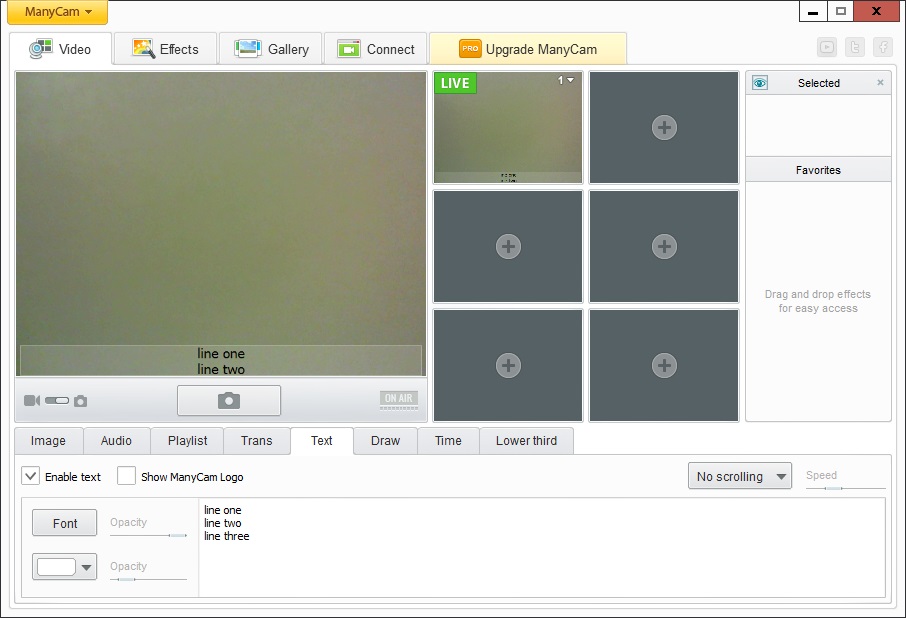
- Adding text, I see I can add two lines of text and it looks good. However, for some reason I can additional lines of text, and none of that will appear. I see no feature to increase the height of the text area.
-
When adding text, I can disable the ManyCam logo. That’s unexpected and pleasant.
 |
- All of ManyCam’s sliders are too damned small to grip and move around. Very bad design.
-
Showing the time is easy enough, but I don’t see a way to move it out of the middle of the screen.
- Oh! I later learned that I can just drag it around the preview area.
-
Lower third is a cool idea. It’s just a bit of graphics using the two-line text title and subtitle concept.
- I have no idea what this is or how to significantly customize it. See Creating a custom .mclt (Lower Third).
- All the tabbed-features at the bottom of the window are trivial to figure out.
- Picture in picture is easy.
- Screencasting and the like is easy.
- Adding multiple sources is also trivial.
-
Adding effects is trivial.
Overall impression – RECOMMENDED ∞
- I don’t want a web-installer. What if I wanted to do video recording on a machine that’s offline?
- The installer having bullshit packaged in is a real serious problem to me.
- Startup is crazy-fast.
-
Every feature was amazingly easy to figure out.
- Would I pay money for it? – Maybe. I see no useful features for the pro version.
- The program itself gives hints as to which features are available with the pro version.
-
The website only lists two interesting features:
- HD resolutions. This is the biggest selling point.
- Desktop capture window selector.
-
“Mobile Source” is actually quite interesting. Being able to easily stream from an Android device would be very useful. I can hypothesize this being done without ManyCam on that device, but I’d bet ManyCam makes it easy.
 |
-
The features page mentions recording videos to show later, but I don’t see how that’s a selling point. The free version already allows this.
- I recommend this software.

