Software >
http://nullwise.com/volumeicon.html
A simple volume icon for your taskbar’s tray.
Works great, no dependencies for me, and does more than what I want.
I got this working, because fbpanel‘s volume plugin decided to not show up again.
Software >
http://nullwise.com/volumeicon.html
A simple volume icon for your taskbar’s tray.
Works great, no dependencies for me, and does more than what I want.
I got this working, because fbpanel‘s volume plugin decided to not show up again.
 |
Software >
https://bitbucket.org/zxtune/zxtune
https://zxtune.bitbucket.io/
Oldschool as fuck, but does everything just right™.
 |
Software > Oldschool music players >
https://www.bannister.org/software/ao.htm
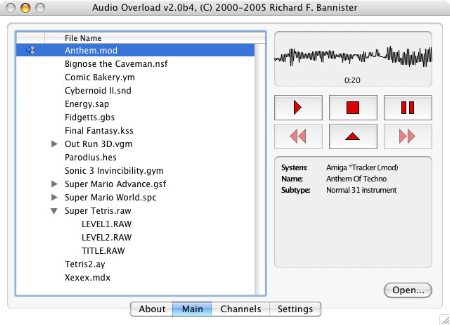
An oldschool music player.
Has potential, but is missing critical features and its development appears to have ceased. Only good for playing ASMA (Atar) .mus, .str, and .wds files.
 |
Software >
Pale Moon > Pale Moon extensions >
was https://github.com/wsdfhjxc/expose-noisy-tabs, but I found a copy at https://github.com/adisib/expose-noisy-tabs
https://addons.palemoon.org/addon/expose-noisy-tabs/
Adds an icon to tabs to indicate which emanates sound and allow one to easily mute them.
2018-03-31 – 1.1.0
(on Wikipedia)
https://www.hamrick.com/
2018-03-03 – 9.6.06 on Windows 10 64bit
It really looks great.
VueScan supports the CanoScan LiDE 120, which I tested it with.
It watermarks what it scans, unless you buy it. It’s not worth $50 for something decent, because my scanner cost that. $100 to get OCR cooked-in also isn’t worth it.
Soon to be renamed System Informer
 |
Software >
https://github.com/winsiderss/systeminformer
https://processhacker.sourceforge.io/
A free, powerful, multi-purpose tool that helps you monitor system resources, debug software and detect malware.
 |
Software > Text editors >
https://github.com/gottcode/focuswriter
https://gottcode.org/focuswriter/
A beautified text editor with the widgets around the edges removed (“distraction-free”).
I started using it because I couldn’t trivially get Geany spell checking working. Once I did get it working I stopped.
Although I’ve used this on Linux a bit, it merely idles in my Windows kit.
 |
Software >
(on Wikipedia)
https://bitsum.com/processlasso-docs/
A host of features to manage processes, such as changing CPU priority. It has lots of automated magic for system happiness. I use it for its control of the CPU’s power profile, making this the equivalent of Linux‘s cpufrequtils.
Highly recommended.