I gave up on this, as I’m no longer playing/testing Wildstar.
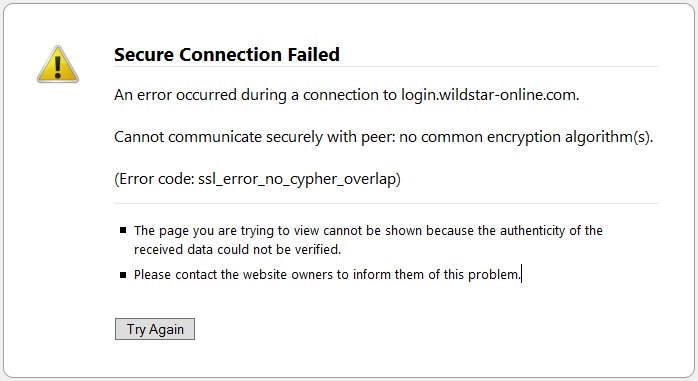 |
2015-10-02, Problem:
Cannot visit login.wildstar-online.com/login to log into Wildstar using Pale Moon 25.7.2 (x64) on Windows 10, updated recently.
I gave up on this, as I’m no longer playing/testing Wildstar.
|
2015-10-02, Problem:
Cannot visit login.wildstar-online.com/login to log into Wildstar using Pale Moon 25.7.2 (x64) on Windows 10, updated recently.
 |
Some notes on how I prepare and eat Soylent.
I haven’t experimented with Soylent flavouring for my own use.
|
Food >
(on Wikipedia)
https://soylent.com/
A meal replacement beverage.
A hands-down spectacular idea and implementation. I ate Soylent for months, and have even eaten it both as a snack, then a meal, and then as my only food. Highly recommended, not just for diet or general health but for lifestyle.
TODO – Screenshots. I would have to use some non-standard method. Windows 8.1 would allow me to take taskbar-only screenshots, but Windows 10 does not.
I’m the very first person ever to want to be able to see the text on my applications in the taskbar.
This is an unsolved problem.
Obsoleted by Windows 10 configuration, redux
 |
2015-08-01 – I switched from Windows 8.1 (Windows 8.1 configuration)
This is an old topic mostly-obsoleted by video conferencing.
See also:
 |
Entertainment > Games >
Path of Exile – (2013 game) >
https://www.pathofexile.com/forum/view-thread/1235695
https://www.pathofexile.com/forum/view-thread/1260664
2.0 Introduced filtering a scripting system to customize the display of loot drops. This makes Path of Exile head and shoulders above its peers.
Moving >
For people in a bad spot, who need to get out of Dodge (to move).
This has notes particular to Atheism.
UPDATE: Commenters report this as the solution:
Flash >
\sudo \apt-get install libcurl3:i386
The remainder of this page may also help. I have not tested this and have since abandoned this project.
Firstly, why in the motherfucking hell can I view a swf using my browser online but not use my browser offline to view an offline swf? This is madness.
I can download something, according to https://help.ubuntu.com/community/FlashPlayerStandalone
I visit was www.adobe.com/support/flashplayer/downloads.html and note that although the top of this page claims there is, there is no 64bit projector.
Tested on Lubuntu (Ubuntu 14.04.2 LTS), updated recently.
Attempting to run it gave a complaint. Every time it complained, I did something like so:
\dpkg -S libXcursor.so.1
It would give me output like so:
libxcursor1:amd64: /usr/lib/x86_64-linux-gnu/libXcursor.so.1.0.2
libxcursor1:amd64: /usr/lib/x86_64-linux-gnu/libXcursor.so.1
One of these lines will be appropriate. Take it, and look at the left. Replace amd64 with i386 and install that. Like so:
\sudo \apt-get install libxcursor1:i386
The complete list of stuff I had to install was:
\sudo  \apt-get  install \
  libglib2.0-0:i386 \
  libxt6:i386 \
  libxcursor1:i386 \
  libnss3:i386 \
  libgtk2.0-0:i386 \
` # `
However, this doesn’t work. I can launch it, but when I attempt to open a swf I get I get:
(flashplayer:3371): GLib-GObject-WARNING **: instance with invalid (NULL) class pointer
(flashplayer:3371): GLib-GObject-CRITICAL **: g_signal_handlers_disconnect_matched: assertion 'G_TYPE_CHECK_INSTANCE (instance)' failed
UPDATE: Commenters report this as the solution:
\sudo \apt-get install libcurl3:i386


